

3.8
Free
BetterTouchTool
Customize your trackpad gestures

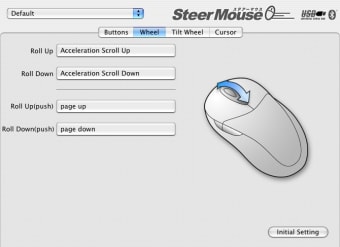
You can customize buttons, wheels and cursor speed freely. SteerMouse supports USB and Bluetooth mice. It will even work with mice designed for Windows PCs.
You can customize your mouse freely even if there is no Macintosh's driver.
SteerMouse has convenient and unique functions that Apple's driver does not include.SteerMouse makes the best use of the Mighty Mouse.
. .
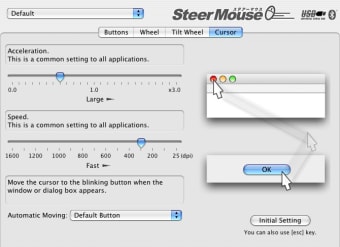
By adjusting both the speed and acceleration, you can customize the best setting that fits the movement of your own hand.
When a window or dialog box is activated, SteerMouse moves the cursor to a specific location on the screen: the default button; the cancel button; the close button; etc.. . You never lose sight of the cursor's position, because the cursor does animated movement.
You can assign horizontal scrolling, a vertical scrolling or shortcut keys.In addition, you can adjust the scrolling speed and acceleration. SteerMouse allows you to customize all buttons on any multi-button mouse, even if it has 8 or 12 buttons.
Enhance Your Mouse Experience with MouseZoom

Find your pointer on your screen
Essential Update for Wireless Mouse Users
Have you tried SteerMouse? Be the first to leave your opinion!
Add reviewFree
Customize your trackpad gestures

Free
Enhance Your Scrolling Experience with Scroll Reverser

Free
Effortless Screen Mirroring with Ditto

Free
MightyMonitor Widget: Free Mac Keyboard Utility

Free
Unlock Your iOS Device Easily with EaseUS MobiUnlock
Enhance Your Mouse Experience with MouseZoom
Find your pointer on your screen
Essential Update for Wireless Mouse Users

Comprehensive Utility for Mac Keyboard Customization

Customize your Logitech peripherals

Mouse magic
Enhance Your Scrolling Experience with Scroll Reverser
Customize your trackpad gestures
Mouse magic
Enhance Your Scrolling Experience with Scroll Reverser

Customization app for Logitech devices

Efficient Keyboard Automation Tool for Mac
Customize your Logitech peripherals
Comprehensive Utility for Mac Keyboard Customization

Fully control the brightness of your back-lit keyboard
Use one mouse and keyboard on multiple desktops

Learn how to type in Arabic
Spy and record all your keyboard keystrokes
Wisely control your Mac remotely
Two-Finger-Scrolling with pre-2005 PowerBooks and iBooks